Why Documentary Archives Fail Before They Even Start
Every year, hundreds of documentary films vanish-not because they weren’t important, but because no one saved them right. A 2023 study by the International Federation of Film Archives found that over 30% of independent documentaries produced since 2010 are already lost or unreadable. These aren’t just files on a hard drive. They’re interviews with people who’ve passed away. Footage from protests, natural disasters, and cultural moments that won’t happen again. If you’re making a documentary today, you’re not just creating a film-you’re building a historical record. And if you don’t plan for the long haul, it’ll disappear faster than you think.
The Three Biggest Mistakes in Documentary Archiving
Most filmmakers think archiving means copying their final cut to an external drive and calling it done. That’s like putting your family photos in a shoebox and hoping they survive the next flood. Here are the three mistakes that kill documentary archives before they’re even born.
- Storing files on consumer-grade hard drives-These drives fail at a rate of 10% per year. A drive bought in 2022 has a 70% chance of being dead by 2027. No warning. No backup. Just silence.
- Using outdated file formats-If your documentary is saved as .MOV from 2015, you’re fine. But if it’s in .AVI or a proprietary codec from a camera no one makes anymore? Good luck opening it in 2030.
- Not documenting metadata-Who’s in the interview? Where was it shot? What date? Without this, your footage becomes a mystery box. Even if the file opens, it’s useless without context.
These aren’t theoretical risks. In 2021, a team at the Smithsonian lost access to 140 hours of oral history footage because the camera manufacturer stopped supporting the codec. The files were still there. The software wasn’t.
What ‘Long-Term’ Really Means in Archival Terms
When archivists say “long-term,” they mean 50 to 100 years. Not five. Not ten. A century. That’s the standard for libraries, museums, and national archives. For documentaries, this isn’t about nostalgia-it’s about accountability. Future historians will look to your film as evidence of how people lived, thought, and resisted.
To meet that standard, you need three things: stable media, open formats, and full documentation.
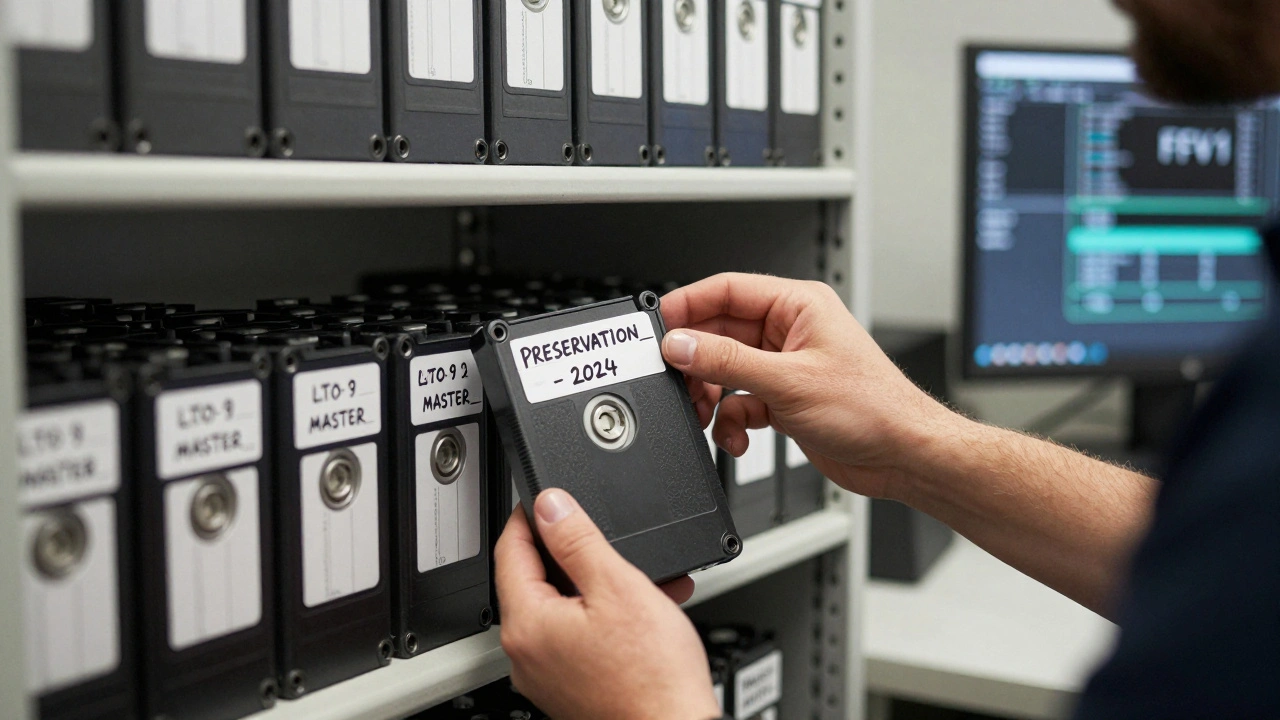
- Stable media means using archival-grade storage: LTO tapes (Linear Tape-Open), M-DISC optical discs, or enterprise-grade SSDs with error correction. Consumer SSDs are not built to last. LTO-9 tapes, for example, are rated for 30 years of active use and up to 30 more in cold storage.
- Open formats mean avoiding proprietary codecs. Use FFV1 for video and FLAC for audio. These are lossless, open-source, and supported by every major archive in the world. The Library of Congress recommends FFV1 as its default for video preservation.
- Full documentation means creating a sidecar file for every clip. This isn’t just a filename. It’s a JSON or XML file listing: location, date, participants, camera model, exposure settings, and any permissions granted. Without this, your footage becomes a ghost.

How to Build a Documentary Archive That Lasts
Here’s how to turn your rough cut into a permanent record. This isn’t theory. It’s what the National Film Preservation Foundation uses for its grant recipients.
- Start during editing-Don’t wait until the film is done. As soon as you ingest footage, make a preservation copy. Use a separate drive labeled “PRESERVATION_MASTER” and never touch it again.
- Convert to FFV1 + FLAC-Use free tools like FFmpeg to transcode your original files. Command example:
ffmpeg -i input.mov -c:v ffv1 -level 3 -coder 1 -g 1 -slices 24 -slicecrc 1 -c:a flac output.mkv. This creates a file that will open in 2050. - Write metadata-Use open-source tools like MediaInfo or ExifTool to extract technical data. Then manually add context: names, locations, dates. Save this as a separate .json file with the same name as the video.
- Store on LTO tapes-Buy LTO-9 tapes (20TB per tape). Use a tape library or a simple drive like the Quantum Scalar i6. Label each tape with a unique ID and store them in a climate-controlled room (50°F, 40% humidity). Never leave them in a garage or attic.
- Make three copies-One on LTO, one on M-DISC Blu-ray (100GB per disc), and one on a RAID-5 server. Keep one copy offsite-in a different city, or with a trusted archive like the Academy Film Archive.
- Test every two years-Play back 5% of your archive annually. If a file won’t open, you have time to recover it before the whole batch degrades.
This process costs less than $500 for a 10-hour documentary. It’s not expensive. It’s just inconvenient. And that’s why most people skip it.
Where to Store Your Archive (And Where Not To)
You’ve made your files. Now where do you put them?
| Storage Type | Longevity | Cost per TB | Access Speed | Best For |
|---|---|---|---|---|
| LTO Tape (LTO-9) | 30+ years | $1.50 | Slow (sequential) | Primary backup |
| M-DISC Blu-ray | 1,000 years (claimed) | $5.00 | Very slow | Offline backup |
| Enterprise SSD (SATA/NVMe) | 5-10 years | $20.00 | Fast | Active access |
| Consumer External Drive | 2-5 years | $1.00 | Fast | Do not use |
| Cloud Storage (AWS, Google) | Depends on provider | $2.00-$5.00 | Fast | Secondary access, not archival |
Cloud storage is tempting. But what happens when Amazon shuts down your account? Or Google changes its pricing? Or the company goes bankrupt? Archives don’t work on subscription models. They need physical, transferable media. LTO and M-DISC are the only options that can be passed down like a book or a photograph.
Who Can Help You? (Real Archive Partners)
You don’t have to do this alone. Several institutions accept documentary deposits-even from independent filmmakers.
- Academy Film Archive (Los Angeles)-Accepts documentaries with cultural or historical significance. Free deposit for qualifying films.
- Library of Congress-Accepts documentaries through the National Film Preservation Board. Requires a completed application and metadata package.
- International Federation of Film Archives (FIAF)-Has over 170 member archives worldwide. Search their directory to find one near you.
- Documentary Film Archive Network (DFAN)-A nonprofit consortium that helps indie filmmakers preserve and share their work. Offers free storage for films under 60 minutes.
These aren’t just storage facilities. They’re institutions that will maintain your work, catalog it, and make it available to researchers, students, and future filmmakers. That’s the real goal: not just saving your film, but ensuring it’s seen again.

What Happens If You Don’t Preserve It?
In 2018, a filmmaker named Marisol Ruiz spent five years documenting the last speakers of a Mayan dialect in Guatemala. She screened it at festivals. It won awards. Then her hard drive failed. The backup drive was lost in a move. The original tapes were never digitized. The footage? Gone. The language? Still disappearing. The people? Dead.
Her film was never archived. So now, it’s a story about loss-not about culture.
Every documentary you make is a chance to say: This mattered. But if you don’t preserve it, no one else will. And when the last person who remembers the events in your film is gone, your archive becomes the only proof they ever existed.
Final Checklist: Your Documentary Preservation Plan
- ☐ Converted all footage to FFV1 (video) and FLAC (audio)
- ☐ Created a metadata file (.json or .xml) for every clip
- ☐ Made three copies: LTO tape, M-DISC, and RAID server
- ☐ Stored one copy offsite (not in your home)
- ☐ Labeled all media with unique IDs and dates
- ☐ Scheduled a playback test for next year
- ☐ Contacted an archive to donate a copy
Do this before you hit “export.” Not after. Not someday. Now.
Do I need to archive raw footage or just the final cut?
Archive both. The final cut is your story. The raw footage is your evidence. Future researchers may want to re-edit your film, verify facts, or study the context behind scenes. If you only save the final version, you’re throwing away half the historical value. At minimum, keep the original camera files and the edited version.
Can I use a NAS for long-term storage?
Only as a working copy, not as your archive. NAS drives are still consumer-grade hard drives. They fail. They get corrupted. They’re not designed for 30-year storage. Use a NAS for active editing and access, but copy your master files to LTO or M-DISC for true preservation.
What if I can’t afford LTO tapes?
Start with M-DISC Blu-ray. A single 100GB disc costs about $25. You can store 10 hours of FFV1 footage on four discs. Store them in a fireproof safe or a bank safety deposit box. It’s not ideal, but it’s better than nothing. The goal is to get your files into a format that lasts, even if the storage medium isn’t perfect.
Is cloud storage safe for documentaries?
No-not as your only archive. Cloud services aren’t designed for permanence. They’re designed for convenience. Companies change policies, shut down services, or go bankrupt. Even if your files are still there, you may lose access. Use cloud storage as a secondary copy, not your primary archive. Always have physical media you can hold in your hands.
How do I know if my file format is obsolete?
Check the Library of Congress Digital Format Sustainability List. If your format isn’t on their “Recommended” or “Acceptable” list, it’s at risk. Avoid anything labeled “Proprietary” or “Deprecated.” Stick to FFV1, WAV, FLAC, and TIFF. These are the gold standard.
Next Steps: What to Do Right Now
If you’re editing a documentary today, pause for 30 minutes. Open your project folder. Find the original camera files. Copy them to a new drive labeled “ARCHIVE_MASTER.” Run FFmpeg to convert them to FFV1 and FLAC. Write a simple metadata file with names, dates, and locations. Burn a copy to an M-DISC. Send it to a friend or archive. That’s it. You’ve just saved a piece of history.
You don’t need a budget. You don’t need a team. You just need to act before it’s too late.



Comments(8)